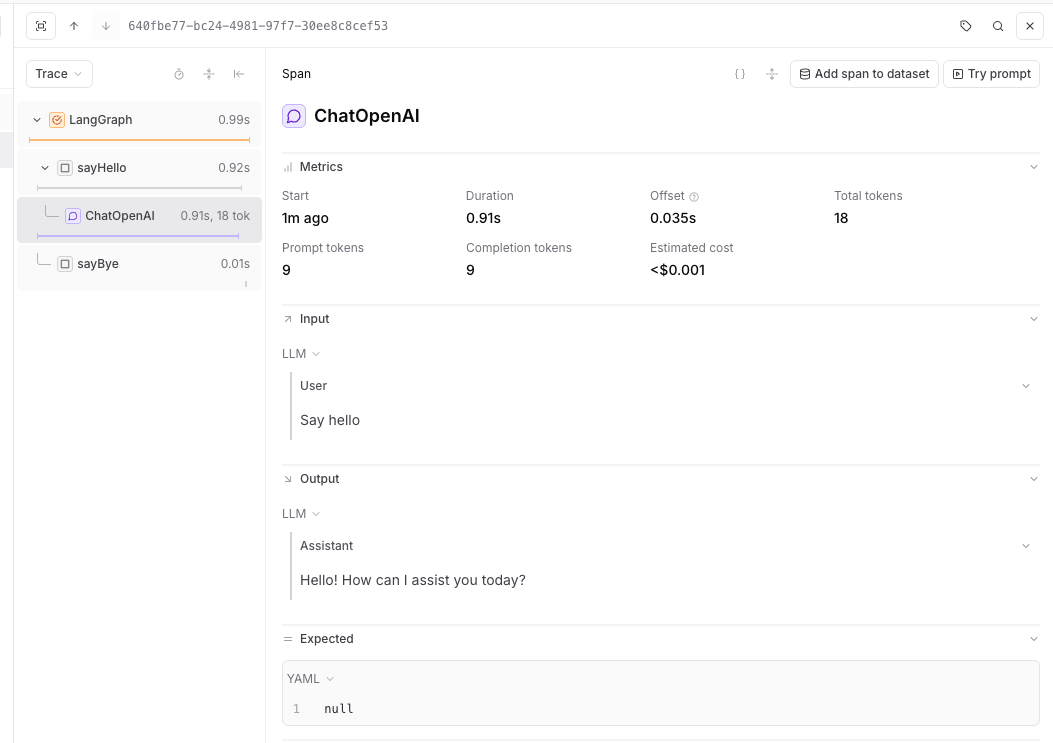
LangGraph is a library for building stateful, multi-actor applications with LLMs. Braintrust traces LangGraph applications through the LangChain callback system, capturing graph execution, node transitions, and model calls.

Setup

Install LangGraph alongside Braintrust and the LangChain packages you use:
# pnpm
pnpm add braintrust @braintrust/langchain-js @langchain/core@^1 @langchain/langgraph@^1 @langchain/openai@^1
# npm
npm install braintrust @braintrust/langchain-js @langchain/core@^1 @langchain/langgraph@^1 @langchain/openai@^1

Trace with LangGraph

Braintrust traces LangGraph through the LangChain callback system. Enable it without code changes through auto-instrumentation, or configure the callback handler manually. See Trace LLM calls for more about auto-instrumentation.

TypeScript auto-instrumentation

To trace LangGraph graphs without modifying your application code, initialize Braintrust normally, then run your app with Braintrust’s import hook to patch @langchain/core at runtime. Requires @langchain/langgraph v1 or later.
trace-langgraph-auto.js
import { END, START, StateGraph, Annotation } from "@langchain/langgraph";
import { ChatOpenAI } from "@langchain/openai";
import { initLogger } from "braintrust";

initLogger({
  projectName: "My Project",
  apiKey: process.env.BRAINTRUST_API_KEY,
});

const model = new ChatOpenAI({ model: "gpt-5-mini" });

const StateAnnotation = Annotation.Root({
  message: Annotation(),
});

const graph = new StateGraph(StateAnnotation)
  .addNode("sayHello", async () => {
    const res = await model.invoke("Say hello");
    return { message: res.content };
  })
  .addNode("sayBye", () => ({ message: "Bye." }))
  .addEdge(START, "sayHello")
  .addEdge("sayHello", "sayBye")
  .addEdge("sayBye", END)
  .compile();

await graph.invoke({});
Run it with the import hook:
node --import braintrust/hook.mjs trace-langgraph-auto.js
The auto-instrumentation example uses plain JavaScript so node --import can run the file directly. The Braintrust APIs work the same in TypeScript projects — compile your TypeScript to JavaScript, then run the compiled file with the import hook.
If you’re using a bundler, see Trace LLM calls for plugin and loader setup.

Python auto-instrumentation

trace-langgraph-auto.py
from typing import TypedDict

import braintrust

braintrust.auto_instrument()
braintrust.init_logger(project="My Project")

from langchain_openai import ChatOpenAI
from langgraph.graph import END, START, StateGraph


class GraphState(TypedDict, total=False):
    message: str


def main():
    model = ChatOpenAI(model="gpt-5-mini")

    def say_hello(state: GraphState):
        response = model.invoke("Say hello")
        return {"message": response.content}

    def say_bye(state: GraphState):
        return {"message": f"{state.get('message', '')} Bye."}

    workflow = (
        StateGraph(state_schema=GraphState)
        .add_node("sayHello", say_hello)
        .add_node("sayBye", say_bye)
        .add_edge(START, "sayHello")
        .add_edge("sayHello", "sayBye")
        .add_edge("sayBye", END)
    )

    graph = workflow.compile()
    result = graph.invoke({})
    print(result)


if __name__ == "__main__":
    main()

Manual callback setup

If you want explicit control over the LangChain handler, configure it directly:
trace-langgraph.ts
import {
  BraintrustCallbackHandler,
  setGlobalHandler,
} from "@braintrust/langchain-js";
import { END, START, StateGraph, Annotation } from "@langchain/langgraph";
import { ChatOpenAI } from "@langchain/openai";
import { initLogger } from "braintrust";

const logger = initLogger({
  projectName: "My Project",
  apiKey: process.env.BRAINTRUST_API_KEY,
});

const handler = new BraintrustCallbackHandler({ logger });
setGlobalHandler(handler);

const StateAnnotation = Annotation.Root({
  message: Annotation(),
});

const model = new ChatOpenAI({
  model: "gpt-5-mini",
});

async function sayHello(_state: typeof StateAnnotation.State) {
  const res = await model.invoke("Say hello");
  return { message: res.content };
}

function sayBye(_state: typeof StateAnnotation.State) {
  console.log("From the 'sayBye' node: Bye world!");
  return {};
}

async function main() {
  const graphBuilder = new StateGraph(StateAnnotation)
    .addNode("sayHello", sayHello)
    .addNode("sayBye", sayBye)
    .addEdge(START, "sayHello")
    .addEdge("sayHello", "sayBye")
    .addEdge("sayBye", END);

  const helloWorldGraph = graphBuilder.compile();

  await helloWorldGraph.invoke({});
}

main();
LangGraph trace visualization in Braintrust showing the execution flow of nodes and their relationships

Resources